Corporate Website Development as a Basis for Success: Why a Professional Corporate Website Saves You Money and Time
Corporate Website — The Digital Heart of Your Business. And if it’s Beating Irregularly, Every Day of a “Crooked” Website Costs You $2,000+.
Imagine: A potential client visits your site and sees outdated design, slow loading times, and a menu that feels like a maze. How many seconds will it take for them to close the tab?
According to HubSpot research:
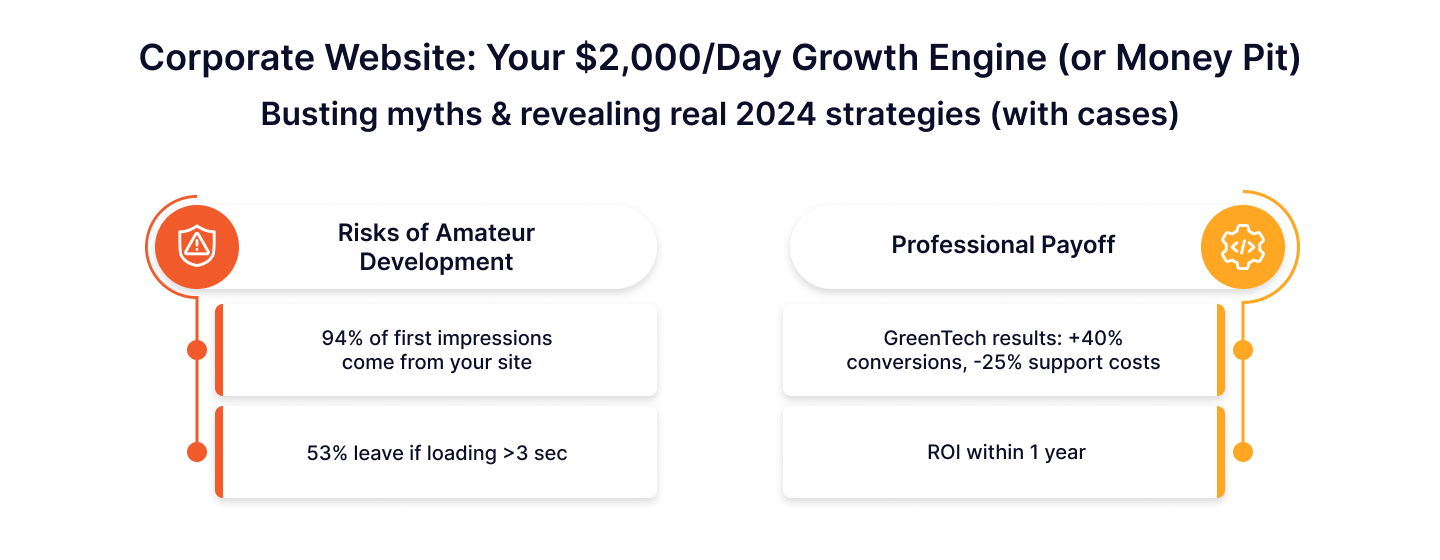
- 94% of first impressions are based on your website.
- 53% of users leave if loading takes more than 3 seconds (Google).
Did you know that 70% of startups fail due to unprofessional corporate website development? This isn’t a myth—it’s data from Forbes.A Cautionary Case:
- A Silicon Valley startup saved $15,000 on development by hiring a freelancer for their custom website.
- Result: a data leak → loss of $80,000 + lawsuits.
- Reason: Outdated code and ignored security testing.
But there’s good news: Professional corporate website development pays off within the first year. For example:
- Company GreenTech after launching their new site:
→ Increased conversion by 40% in 3 months.
→ Reduced support costs by 25% through process automation.
In this article, you’ll learn:
- How to avoid hidden costs that drain your budget (spoiler: saving on contractors is a trap).
- Why a professionally built site pays off 2-3 times faster, even with upfront costs.
- How to choose a contractor who will turn your site into a growth tool, not disappear after payment.
How much money is your site losing due to errors? Let’s start with the main question: How is the perfect product created, and why can’t it be done without a team of specialists?
The Corporate Website Development Process: Who and How Creates the Perfect Product?
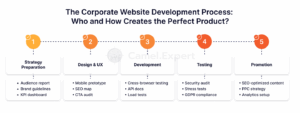
Building a corporate website is like constructing a skyscraper: without a clear plan, a team of experts, and quality control, the project is doomed. Partnering with a web design agency ensures each of the 5 key stages is executed flawlessly, where every specialist acts like a cog in a clockwork mechanism. Skip one—and the entire system fails.
1. Strategy Preparation: Where the Idea is Born
- Marketer — the market “scout.”
Example: For a fintech startup, they discovered that 80% of clients are men aged 25-40, who conduct 70% of transactions via mobile. Solution: Focus on iOS optimization. - Brand Manager — the creator of DNA.
Case: GreenEnergy increased brand recognition by 120% in 6 months by switching from “corporate blue” to natural tones and adding a leaf logo. - Business Analyst — the translator of goals into numbers.
Their KPI: “Increase conversion from 2% to 5% in 3 months by simplifying the order form.”
2. Web Design and UX: Why UX is More Important Than “Beauty”
- UX/UI Designer — the architect of convenience.
Failure: A furniture store lost 50% of orders due to a 5-step payment form. Fix: Reduced to 2 steps → conversion increased by 80%. - Copywriter — the faceless seller.
Example: Changing “Submit Application” to “Get 30% Off Today” increased CTR by 45%. - SEO Specialist — the guide to the top.
Result: 500 keywords for an EdTech platform brought in 1,000 leads per month.
3. Web Development Services: How Code Turns into Money
- Frontend Developer — the visual magician.
According to Google, 53% of users will leave if a site isn’t mobile-friendly. Example: An online store reduced bounce rate by 60% after a mobile redesign. - Backend Developer — the “invisible genius.”
Case: Integrating a chatbot with CRM reduced lead processing time from 2 hours to 10 minutes. - Fullstack Developer — the jack-of-all-trades.
Ideal for MVP: Created a working SaaS platform prototype in 2 weeks.
4. Testing: How to Find a Needle in a Haystack of Code
- QA Engineer — the bug hunter.
Cost of a mistake: A startup lost $10,000/day due to a payment system failure. The tester found the issue in 2 hours. - DevOps Engineer — the guardian of stability.
Example: During Black Friday, their setup handled 5,000 visits/min → the company earned $1 million in a day.
5. Promotion: How to Bring in Clients
- SEO + PPC — the traffic engines.
Result: The site ranked in the top 3 for “CRM for small businesses” → conversion increased by 200%. - Content Marketer — the storyteller.
Case: A series of case studies increased time spent on the site from 1 to 7 minutes.
A Cheap Contractor is Like an Iceberg: 75% of Costs are Hidden Underwater
A New York startup decided to save money by hiring a freelancer for $20,000. Result? The website “crashed” on the first day of sales launch, and code errors led to a client data leak. Fixing it cost $50,000 + $100,000 in lawsuits.
Let’s compare two scenarios for a New York startup:
| Category | Cheap Freelancer | Professionals |
| Development | $20,000 | $90,000 |
| Error Fixes | $50,000 | $0 |
| Lawsuits | $100,000 | $0 |
| Total | $170,000 | $90,000 |
Why does this happen?
- Cheap contractors skip testing and analytics stages.
- They use outdated technologies that don’t scale.
- They offer no guarantees: they disappear after payment.
Now that you know the process, let’s explore how design impacts profit. Suppose your site is as beautiful as a Van Gogh painting. But what if users can’t find the “Buy” button? Website design services don’t just focus on aesthetics—they ensure usability and conversion. Keep reading—we’ll tell you how to avoid this mistake.
Corporate Website Development and Design: How to Combine Beauty and Functionality?
A corporate website is not an art object—it’s a sales tool. If a user admires the design but can’t find the “Buy” button, your masterpiece turns into a digital museum. Let’s explore how a web design agency can help balance aesthetics and usability so your business website works for you.
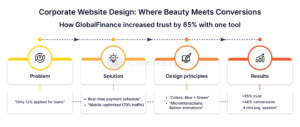
Case Study: How an Interactive Calculator Increased Customer Trust by 65%
The financial company GlobalFinance faced a problem: only 12% of visitors applied for a loan online. Customers didn’t trust complex forms and opaque calculations.
Solution:
- Interactive Calculator
- Users entered the amount and term → the system instantly displayed a payment schedule.
- Infographics replaced “walls of text”: visualized interest rates and amounts.
- Minimalist Design
- Only necessary fields were included.
- Removed ads and pop-ups.
- Mobile Optimization
- The calculator adapted to smartphone screens (70% of traffic was mobile).
Results in 3 Months:
- Customer trust increased by 65% (survey).
- Conversion to applications rose by 40%.
- Time spent on the site increased from 1.5 to 4 minutes.
Why it worked?
- Colors: Blue (trust) + green (growth).
- Microinteractions: Button animations created responsiveness.
- Clarity: No unnecessary steps—just numbers and actions.
Navigation: Why 88% of Users Won’t Return to Your Site?
“88% of users won’t return to a site with poor navigation” (Jakob Nielsen, Nielsen Norman Group).
Failure Example:
An electronics e-commerce store lost $120,000/month due to:
- A menu with 10+ sections.
- No search function.
- Hidden filters (6 clicks to find “headphones”).
Fixes:
- Simplified the menu to 5 categories.
- Added a “smart” search with suggestions (e.g., typing “AirP” → “AirPods Pro”).
- Moved filters under the header.
Results:
- Conversion increased by 55%.
- Average order value grew by 20% (users added more accessories).
Web Design Rules That Convert
- The 8-Second Rule: Users decide to stay or leave within 8 seconds. The first screen must answer: “How can you help me?”
- CTA Buttons as Beacons: Use contrasting colors (red, orange) and action verbs (“Start Free Trial,” “Download PDF”).
- Loading Speed ≤ 2 Seconds: Every second of delay reduces conversion by 7% (Portent). Optimize images with tools like TinyPNG and enable caching.
- Consistent Style: Fonts, colors, and icons must align with brand guidelines (e.g., Apple uses no more than 2 fonts).
- White Space is Your Friend: Overloading elements increases cognitive load.
- Test with Real Users: 60% of design decisions fail without feedback (Hotjar).
- Minimize Steps to Goal: Checkout in 3 clicks, subscription in 1 email field.
But even perfect design won’t save you if you’ve made a mistake with choosing the wrong contractor. Let’s say you paid $50,000 for a website, and it crashes with 100 visitors. How can you avoid it? Read on.
Corporate Website Development: Why Portfolio ≠ Guarantee of Success?
Failure Story: How “Space-Age” Design Destroyed $80,000
The startup HealthTech+ built a platform for doctors. They chose an agency with a “Hollywood blockbuster” portfolio: 3D animations, parallax effects, neon lighting. The result was shocking:
- Conversion dropped by 30% — doctors aged 45+ didn’t appreciate the “futurism.”
- Bounce rate: 85% — the site took 6+ seconds to load.
- SEO traffic: 0 — meta tags and alt attributes were missing.
Agency Mistakes:
- Ignoring the Target Audience: 80% of users were doctors aged 40+ who wanted quick information, not animations.
- No A/B Testing: Web design wasn’t tested on real users.
- Focus on “Wow Effect”: Complex transitions and minimal text confused users.
How to Choose a Contractor: 5 Questions That Will Save Your Budget
- “What metrics have you improved in similar projects?”
- Good answer: “Increased conversion from 2% to 7% in 3 months by simplifying navigation.”
- Bad answer: “Made the site ‘beautiful.'”
- “How do you incorporate analytics into web design?”
- Example: Heatmaps showed that 60% of users missed the CTA → the button was enlarged by 30% and turned orange.
- “Show mobile adaptation.”
- Check how the site looks on a 320px screen (iPhone SE). Overlapping elements are a red flag.
- “How do you ensure fast loading?”
- Correct answers: “Use lazy loading for images,” “Connect a CDN,” “Compress code with Webpack.”
- “Do you provide content recommendations?”
- Web design without content is like a Ferrari without fuel. A good contractor will suggest structure and key blocks.
Why is this important?
The HealthTech+ story is not unique. According to Clutch, 65% of clients are disappointed by contractors who ignore analytics.
Corporate Websites: How They Become the Face of a Brand?
Expert Web: Why Analytics is the Foundation of Every Decision in Corporate Website Development?
A Corporate Website isn’t just the “face” of a company—it’s a tool that must generate profit. Without data, it’s blind. Here’s how analytics turns visitors into customers and mistakes into opportunities.
Example 1: How a Red Button Increased Watch Sales by 45%
The online store LuxeWatches faced a problem: only 2.1% of visitors completed a purchase. The solution came through A/B testing:
- Variant A: Blue “Checkout” button at the bottom.
- Variant B: Red “Buy Now” button in the top-right corner.
Results in 14 Days:
- Variant B increased conversion to 3.05% (+45%).
- Average order value grew by 18%—customers added more straps and packaging.
What Analytics Revealed:
- Red subconsciously signals urgency (Color Matters research).
- “Buy Now” created a sense of instant action.
- The button’s position in the “golden triangle” (top-right corner) caught 70% of users’ attention.
Example 2: How Heatmaps Saved an Educational Platform
The company EduPro implemented heatmaps and discovered:
- 60% of users scrolled to the testimonials but missed the “Sign Up” button.
- 40% clicked on static images, mistaking them for interactive elements.
Fixes in 7 Days:
- Duplicated the “Sign Up” button at the top and bottom of the page.
- Added hover animations for clickable elements.
Results:
- Time on site increased from 1 to 5 minutes.
- Conversion rose by 55%.
The Success Formula: 1 in Analytics→5 in Profit
The SaaS platform CloudFlow proved that data collection and analytics pay off:
| Year | Investment | Profit | ROI |
| 2022 | $10,000 | $50,000 | 5x |
| 2023 | $25,000 | $130,000 | 5.2x |
How They Did It:
- End-to-End Analytics: Integrated Google Analytics 4 + Mixpanel.
- Micro-Goal Tracking: Clicks on “Demo,” guide downloads, video views.
- Personalization: Showed US users English case studies and German users localized versions.
Statistics That Will Make You Act:
- 72% of companies that implemented analytics increased conversion by 20%+ (Aberdeen Group).
- Every dollar invested in A/B testing brings $30 in profit (Forrester).
Conclusion: Analytics isn’t a “luxury for big companies”—it’s a necessity. Even small, data-driven changes can bring hundreds of thousands in profit.
Web Design and Development: A Story of Failure
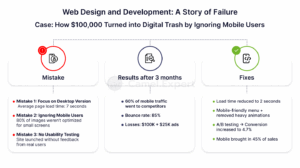
Case: How $100,000 Turned into Digital Trash by Ignoring Mobile Users
The startup StyleHub (fashion marketplace) decided to impress its audience with “creativity” but forgot about analytics:
Mistake 1: Focus on Desktop Version
- Futuristic web design with 3D animations, parallax effects, and video backgrounds.
- Average page load time: 7 seconds (should be ≤ 2 seconds).
Mistake 2: Ignoring Mobile Users
- On smartphones, elements overlapped, and menus didn’t open.
- 80% of images weren’t optimized for small screens.
Mistake 3: No Usability Testing
- The site launched without feedback from real users.
Results After 3 Months:
- 60% of mobile traffic went to competitors.
- Bounce rate on smartphones: 85%.
- Losses: $100,000 development + $25,000 on ads.
Fixes (Cost: $40,000):
- Removed “heavy” animations → load time reduced to 2 seconds.
- Rewrote CSS: Simplified the menu to a “hamburger” and replaced parallax with static images.
- Conducted A/B tests on the new version.
Results:
- Conversion increased from 1.2% to 4.7%.
- 45% of sales came from mobile devices.
Why This Matters to You:
This case is a reminder: even the most creative design will fail without analytics and testing.
What Should You Do?
Before launching, ask:
- How does the site look on an iPhone 12 or Samsung?
- Do elements load in 2 seconds on 3G?
- Are CTA buttons visible without scrolling?
If you don’t have answers, you’re playing Russian roulette.
Corporate Websites: More Than a Digital “Business Card”
A corporate website is a dynamic tool that requires attention, data, and regular adaptation. The StyleHub story shows how easy it is to lose $100,000 by ignoring analytics and mobile users. But even in such situations, there’s a way out: turn to a web design agency that knows how to turn mistakes into opportunities.
How to Avoid Similar Mistakes?
- Rely on Analytics: Data is the compass that guides web design and functionality. For example, implementing AI recommendations for an e-commerce client increased revenue by 120% in 4 months.
- Test and Scale: Start with a landing page but choose solutions that can evolve into a multilingual portal with CRM integration.
- Don’t Skimp on Security and Speed: The site must handle traffic and load instantly—this is critical for retaining customers.
Tips for Those Ready to Act:
- Conduct a Site Audit: A free analysis will help identify weaknesses.
- Order a Prototype: See the structure and functionality before full-scale development.
- Choose Guarantees: Good contractors are always open to revisions if goals aren’t met.
P.S. According to Camel Expert, 87% of companies recoup their website investment within the first 12 months. If you’re ready to start, results won’t be far behind.
Conclusion
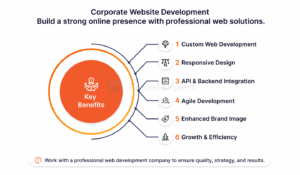
In conclusion, corporate website development is a critical investment for any business aiming to establish a strong online presence. By partnering with a top web development company, you gain access to a skilled development team that offers a range of website design services, including custom web development, responsive web design, and back-end development. Whether you need a corporate website from scratch or an engaging ecommerce website, an expert web development agency ensures your project aligns with modern web technologies and design strategies.
From the development life cycle to deployment, a professional development company ensures your website functions seamlessly, combining functionality with visually appealing design layouts. With services that include API development, agile development, website design services, and marketing services, hiring a web development company guarantees a successful website tailored to your business needs. Trusting an experienced website development company not only enhances your corporate web presence but also delivers professional web solutions that drive growth and efficiency.
1. Checklist: 7 Steps for Professional Corporate Web Development
For: Business owners, startup founders, project managers.
- Analysis and Strategy
- Conduct target audience research (age, location, pain points).
- Define KPIs: “Increase conversion by 30% in 6 months.”
- Example: How GreenEnergy increased brand recognition by 120% through rebranding.
- Design and UX
- Create a prototype in Figma/Adobe XD.
- Test the user journey: no more than 3 clicks to the target action.
- Tip: Use contrasting CTA buttons (like in the LuxeWatches case).
- Development
- Choose a tech stack (e.g., React + Node.js).
- Must-have: Mobile responsiveness (53% of users leave without it, Google).
- Testing
- Check loading speed via PageSpeed Insights (goal: ≥ 90/100).
- Example: A tester saved a startup from losing $10,000/day.
- SEO and Content
- Build a semantic core (at least 200 keywords).
- Write meta tags and alt attributes for images.
- Launch and Analytics
- Connect Google Analytics 4 + Hotjar.
- Set up goals: clicks on “Buy,” downloads of price lists.
- Support
- Sign a contract for monthly updates and backups.
2. Checklist: 10 Rules for Conversion-Focused Design
For: Designers, marketers, business owners.
- Loading Speed ≤ 2 Seconds
- Optimize images via TinyPNG.
- Enable lazy loading.
- Mobile Adaptation
- Test the site on iPhone SE (320px screen).
- Example: StyleHub lost 60% of traffic due to a non-functional mobile version.
- Navigation
- No more than 5 menu items.
- Add a “smart” search with suggestions.
- Colors and Fonts
- Use no more than 3 colors and 2 fonts (like Apple).
- Red for CTAs (urgency), blue for trust.
- Microinteractions
- Button hover animations (like in GlobalFinance).
- Loading indicators for forms.
- Content
- Replace “Submit Application” with “Get 30% Off Today.”
- Add social proof (testimonials, case studies).
- Testing
- Conduct A/B tests for two design versions.
- Example: An A/B test on a button increased conversion by 45%.
- Security
- Install an SSL certificate.
- Hide sensitive data (like in CloudFlow).
- Accessibility
- Add alt texts for images.
- Check color contrast for visually impaired users.
- Backups
- Set up automatic daily backups.
3. Checklist: How to Choose a Contractor for Corporate Website Development and Avoid Budget Loss
For: Business owners, startup founders.
- Portfolio Review
- Request 3 case studies with metrics (e.g., “increased conversion from 2% to 7%”).
- Avoid agencies that only show “pretty pictures.”
- Technical Questions
- “What technologies do you use?” (Good answer: React, Next.js, Headless CMS).
- “How do you ensure fast loading?” (Correct: lazy loading, CDN, code compression).
- Contract and Guarantees
- Demand phased payments (30% upfront, 70% after testing).
- Example: HealthTech+ lost $80,000 due to lack of guarantees.
- Analytics and Reporting
- Clarify if Google Analytics and micro-goal tracking will be set up.
- Request weekly progress reports.
- Post-Launch Support
- Check if technical support is included in the cost.
- Example: StyleHub spent $40,000 fixing errors after the fact.
- Recommendations
- Ask for contacts of 2-3 past clients.
- Check reviews on Clutch or Google.
How to Use the Checklists:
- Print them out and check off each step.
- Share with your team to align tasks.
- Use as a basis for your brief when discussing with contractors.